Try to imagine: you’re sitting in a cozy café somewhere on the outskirts of Helsinki, surrounded by snow, coffee, and music, and in your hand, a smartphone that opens the door to another universe. In recent years, the word “Trust” has become almost magical in crypto circles. Some see it as a promise of independence from banks and exchanges, while others complain of inconvenience. It’s no surprise: Trust Wallet isn’t just an app, but an entire ecosystem where you manage your keys, choose your coins, and even interact with decentralized apps. According to the official blog, the wallet was created by developer Viktor Radchenko in 2017 and quickly gained popularity, and in 2018, the project was acquired by the Binance exchange. It now has over 100 million users and supports over 10 million crypto assets and NFTs across 100+ blockchains .
One detail is particularly important: Trust Wallet remains a non-custodial wallet. This means you store your private keys yourself; the app merely helps you manage them. This is confirmed by the official documentation: the wallet stores keys locally and generates a 12-word recovery phrase , which must be written down and kept secret. This approach provides independence, but also comes with responsibility: if you lose the phrase, you lose access.
🚡 Key features of Trust Wallet
✅ Universal storage
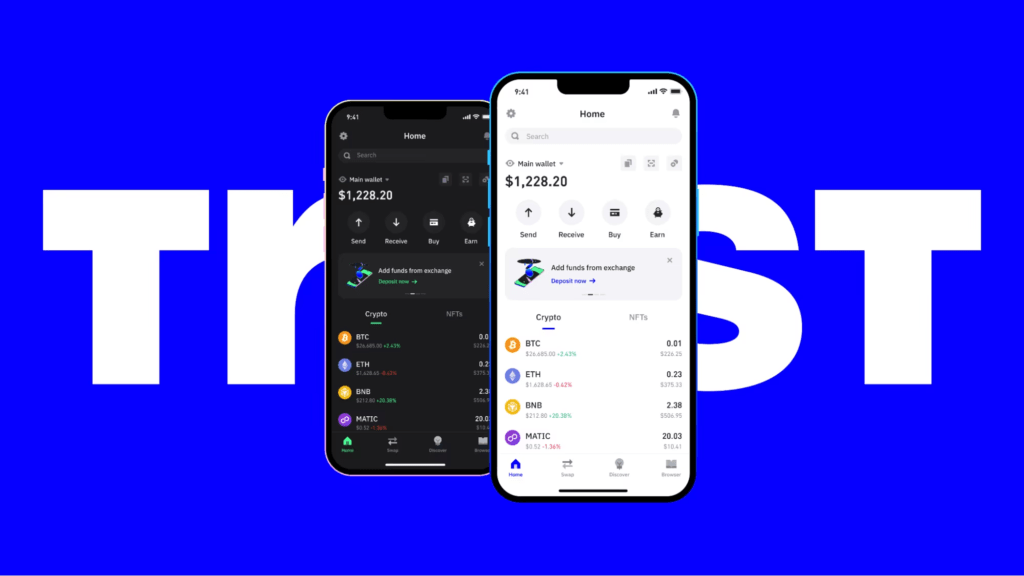
Trust Wallet was originally created for Ethereum, but now supports dozens of networks and hundreds of tokens. The wallet can store Bitcoin, Ethereum, BNB, Litecoin, XRP, Solana, Tezos, and many other cryptocurrencies. The app supports over 40 blockchains and 160,000+ coins . Users don’t need to install separate programs: a single interface integrates multiple networks, and new tokens are discovered automatically.
🔍 Web3 and dApp browser
Trust Wallet is not only a vault but also a gateway to Web 3. Its built-in browser allows you to connect to decentralized applications: stablecoins, NFT marketplaces, gaming platforms, and DeFi protocols are accessible directly from the wallet. Giottus’s article notes that the Web 3 browser allows you to work with Uniswap, Aave, OpenSea, and other platforms without switching between applications.
💰 Swaps, exchanges, and decentralized exchange
One of Trust Wallet’s key strengths is its built-in exchange module. Users can quickly exchange tokens via the DEX (decentralized exchange) or the “Swap” tab. The official website provides step-by-step instructions: select the “From” and “To” networks, specify the tokens and amount, and confirm the transaction. The app automatically selects the optimal route to minimize fees. Limit orders on the BEP-2 network are available in the “Exchange” mode, which is useful for traders.
🌿 Staking and passive income
If you want to not only store your cryptocurrency but also earn rewards, Trust Wallet offers staking. According to Giottus, the app supports over 20 Proof-of-Stake coins and displays expected returns. The Russian-language guide at indicates that the mobile version supports staking for coins such as Algorand, Cosmos, Tron, BNB, Kava, and Tezos; the menu displays the minimum amount, interest, and maturity date. This effectively turns Trust Wallet into a small “bank” where your funds can work.
💻 Buying cryptocurrency with fiat
The official website explains that users can purchase cryptocurrency directly within the app using bank cards and partner services (Mercuryo, Simplex, MoonPay, etc.). This is especially convenient for beginners: purchasing is available in just a few clicks and does not require sending funds to third-party exchanges.
✔️ Import and manage multiple wallets
Trust Wallet allows you to import or create multiple wallets in a single app. For example, you can link an existing MetaMask wallet or even connect a hardware Ledger for additional security. This approach is appreciated by experienced users who separate their assets according to their intended purpose.
🚤 Security: More than just PIN and biometrics
Security is a top priority for this wallet. According to the official description, Trust Wallet protects private keys with local encryption and supports PIN and biometric authentication . Giottus experts add that the app’s code is partially open source, meaning it can be reviewed by third-party developers; a security audit is conducted, and the app warns about suspicious links.
However, there are some weaknesses. Giottus’ review notes the lack of traditional two-factor authentication (2FA) and some user complaints about slow support. Furthermore, as crypto-mining.blog notes, Trust Wallet lacked a browser extension for a long time, which was off-putting for users accustomed to working on a desktop. Despite the addition of the extension, the mobile interface remains the primary one.
📝 How to set up a wallet and maintain access
Beginners often worry: what if they lose their smartphone? How do they regain access? The article describes the wallet creation process in detail: after installation, select “Create a New Wallet,” save your recovery phrase on paper, and then confirm it. Then you can set a PIN and enable biometrics for login. These steps may seem tedious, but they are the ones that save you from losing money. Don’t keep your seed phrase in the “notes” section of your phone; instead, write it down and store it in a dry place.
🙉 Pros and Cons: An Honest Look
- Advantages
- Convenience and simplicity – the intuitive interface makes Trust Wallet attractive to beginners, and the availability of Russian localization helps users get started quickly.
- Support for a huge number of assets – the ability to store Bitcoin, meme coins, NFTs, and tokens from different networks in a single application.
- Web3 access – a built-in browser and the ability to interact with DeFi and NFT platforms.
- Staking and passive income are an opportunity to earn money on Proof-of-Stake coins without going to exchanges.
- Code transparency – some of the code is open source, audits are conducted, and the application does not require KYC.
- Flaws
- No 2FA – no traditional two-factor authentication.
- Mobile focus – for a long time there was no full-fledged browser extension.
- The vast selection of tokens can be confusing for beginners; some projects may be scams.
- Hot wallet – internet connection means potential vulnerability. For larger amounts, it’s better to use cold storage, such as Ledger or Trezor.
- Support – sometimes users complain about slow response from the support team.
🌍 Who is Trust Wallet suitable for?
Trust Wallet is a good starting point for those looking to get started in the crypto world. It combines a wallet, exchanger, and web-3 portal into a single app. The website claims it’s one of the best options for beginners thanks to its security, portability, and extensive list of supported coins. However, the authors warn: for truly large investments, it’s better to invest in a hardware wallet.
🌟 Competitor comparison and general advice
Which wallet should you choose: Trust Wallet or MetaMask? A post on crypto-mining.blog presents the arguments: MetaMask offers a convenient browser extension but supports fewer blockchains and tokens, while Trust Wallet excels thanks to its vast coin base and functionality. Therefore, the choice depends on your needs: if you need Web3 functionality on mobile, Trust Wallet will be more flexible. If you work in a browser and only need the Ethereum network, MetaMask may be easier.
Regardless of your choice, follow basic safety rules:
- Download wallets only from official websites (you will find the download link for Trust Wallet below);
- never share your seed phrase ;
- Stay updated and avoid phishing sites;
- For large amounts, use hardware wallets.
🏃 Conclusion: A step forward into a decentralized world
Trust is a fragile thing. In the world of cryptocurrency, it’s built not on the promises of beautiful websites, but on open source code, self-management, and your attentiveness. Trust Wallet has proven to be one of the most popular mobile wallets because it combines convenience with powerful functionality and puts users in control. It’s not perfect: the lack of 2FA, its mobile-first nature, and the abundance of dubious tokens present challenges. But by understanding the risks and following security measures, you can get a reliable tool for storing, exchanging, and growing your crypto assets.
The only question left to ask yourself is: are you ready to be your own bank and key keeper? Or do you prefer to remain within the confines of centralized services? The choice is yours.
Read more:
 Top Cold and Hot Crypto Wallets BTC/ETH/ETC/BCH/LTC/XMR/DOGE+
  metamask. Ethereum wallet guide and review
  JaxxWallet: Review, Installation, Download, and Use
  Electrum Doge: How to Download and Use. Comparison of MultiDoge and Dogecoin Core
  BitPay Wallet for Windows: Download, Overview, Installation, Use
  Mining Laws and Regulations in 2025: Russia, EU, and the US
  The Best PoW Cryptocurrencies to Mine in 2026
  Cryptocurrency anonymity: the basics of confidential use of Bitcoin BTC
  NiceHash Review: Pros and Cons of the Mining Service