Braiins Toolbox is a convenient program for managing ASIC miners from a single computer. We’ll explain in simple terms how to download, configure, and use Braiins Toolbox on Windows, macOS, and Linux without complicated settings or unnecessary confusion.
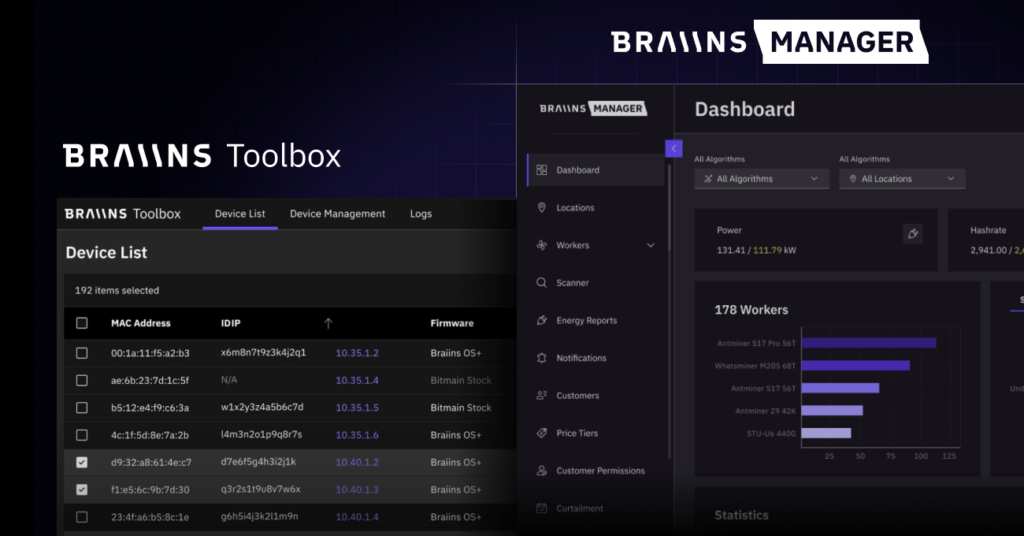
🛠 Braiins Toolbox — easy mining control without the hassle
Sometimes it seems like mining isn’t about earning cryptocurrency, but rather a never-ending struggle with settings.
One miner crashed.
Another overheated.
A third, for some reason, mines in the wrong direction.
And now you’re no longer counting your profits, but sitting among IP addresses, browser tabs, and frustration. Sound familiar?
That’s exactly what Braiins Toolbox is for —a tool that brings order to this digital chaos.
To put it simply: it’s a computer program that helps you manage your miners from one place . No running around. No dozens of tabs. No headaches.
🤔 What is Braiins Toolbox and why do I need it?
Braiins Toolbox is a free program from the Braiins team, known for Slush Pool and Braiins OS.
It installs on a regular PC or laptop and allows you to:
- Find all ASIC miners on your local network
- manage them from one interface
- update firmware
- change settings
- reboot devices
- monitor the condition of the farm
Simply put, Braiins Toolbox is a control panel for your mining rig .
It doesn’t matter whether you have two ASICs or twenty—the operating logic remains the same.
📥 How to download Braiins Toolbox without getting confused
The program is downloaded from the official Braiins website . It’s free, with no subscriptions or hidden restrictions.
- The official website of Braiins Toolbox is
After loading, everything happens quite routinely:
On Windows
Download the archive, unzip it to any folder, and run the file.
No installation is required—the program runs immediately.
A security warning may appear the first time you launch it. This is normal.
Just allow it to run—Braiins Toolbox isn’t doing anything suspicious.
Once launched , a browser will open , displaying the program interface. This isn’t a website or a cloud service—everything runs locally on your computer.
On macOS and Linux
The principle is the same: download, launch, and open the interface in your browser.
The differences are minimal and don’t affect operation.
🔍 What happens on first launch
When Braiins Toolbox first launches, it prompts you to scan your network .
Sound scary? Actually, it’s not.
The program simply checks which devices in your local network are similar to miners and displays a list of them.
If you have standard settings, everything happens automatically.
If you changed the passwords on your miners, you’ll need to enter them in the settings so Toolbox can connect.
In a few seconds you will see:
- Miner IP addresses
- device models
- current status
- basic indicators
And this is where the first “wow moment” usually happens:
the entire farm is in one window .
🧭 How to use Braiins Toolbox without a technical background
The good news: no in-depth knowledge is required .
The interface is logical and quite user-friendly.
Miner management
You simply check the required devices and select an action:
- reboot
- apply settings
- update firmware
- stop or start mining
No magic. Just like in regular programs.
Setting up pools
You can immediately ask:
- main pool
- reserve pools
- connection parameters
And apply them to all miners at once .
No need to go into each one individually—Toolbox does it for you.
Firmware update
If you’re using the standard Bitmain firmware or want to upgrade to Braiins OS, Toolbox can do it automatically.
It automatically downloads the required version and installs it on the selected devices.
All you have to do is confirm the action.
⚙️ What about the power and temperature settings?
Even if you’re a beginner, it’s good to know:
Braiins Toolbox allows you to limit power consumption and manage operating modes.
This is especially important if:
- Electricity is expensive
- hot
- the farm is located in a residential area
You can set a more “calm” mode and not worry about the miners working to the point of exhaustion.
🧱 ASIC support and compatibility
Braiins Toolbox works best with Antminers —that’s what it was designed for.
But the program can also:
- detect Whatsminer
- show their status
- perform basic actions
Full control is not available for all models, but even simple monitoring is already a big plus.
🧠 Why even beginners love this tool
It’s a paradox, but it’s true:
although Braiins Toolbox was originally created for professionals, it’s often even easier for beginners to use than standard ASIC interfaces.
The reasons are simple:
- one screen instead of dozens of tabs
- less chance of breaking something
- clear logic of actions
- less manual work
It’s like switching from the command line to a normal graphical interface.
🏁 Bottom Line: Is Braiins Toolbox Worth Using?
In short, yes, it is worth it .
Especially if you:
- just starting to understand mining
- don’t want to drown in settings
- Do you want to see the entire farm?
- value simplicity and control
Braiins Toolbox doesn’t perform miracles or guarantee profits.
But it significantly lowers the entry barrier , saves time, and helps avoid common mistakes.
And in mining, as we know, peace and order are also an asset .
Read more:
 ANTMINER FIRMWARE: official firmware for ASICs
  AwesomeMiner (Crack): Download CPU/GPU/ASIC/FPGA Miner for Windows/Linux
  Mining Laws and Regulations in 2025: Russia, EU, and the US
  ASIC Miner Maintenance and Repair: A Beginner’s Guide
  Mining Ethereum in on GPU and ASIC
  Best Miner for Ravencoin (RVN): T-Rex, GMiner or NBMiner?
  The Best PoW Cryptocurrencies to Mine in 2026