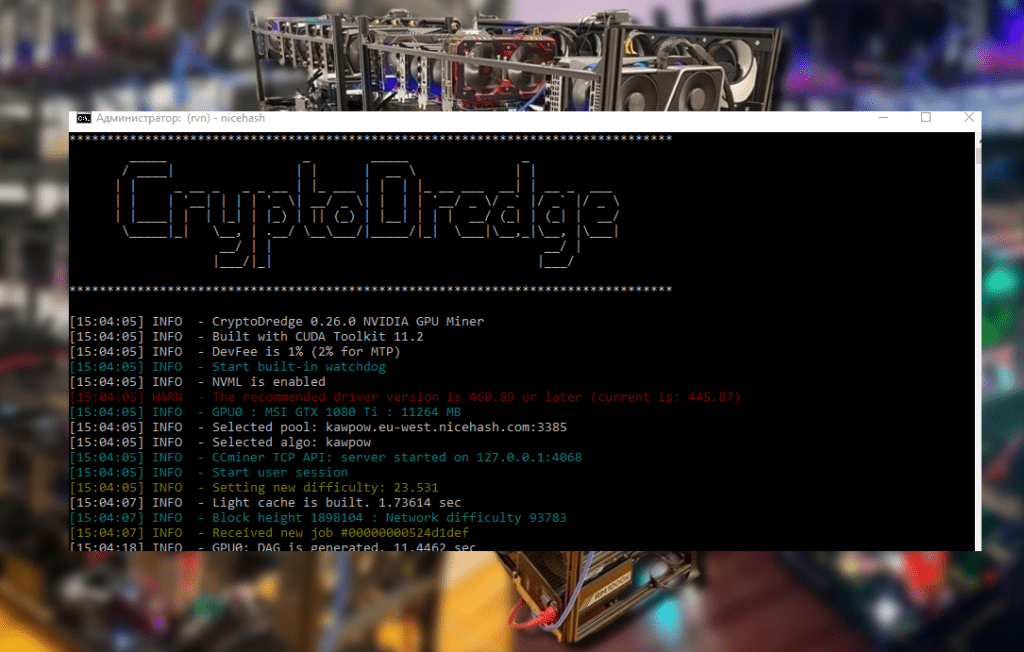
Looking for the most efficient Ravencoin miner ( KawPow algorithm )? In our review, we compare T-Rex , GMiner , and NBMiner – including hashrate, stability, developer fee (DevFee), GPU compatibility, and other nuances. Find out which RVN miner is the most profitable and best for you!
🏆 Best Ravencoin Miner: T-Rex, GMiner, or NBMiner?
It would seem that there are three programs, but only one debate: which one is the best for mining Ravencoin using the KawPow algorithm? Every experienced miner has probably asked this question at least once. Indeed, when it comes to mining RVN , the tried-and-true heavyweights— T-Rex , GMiner , and NBMiner —come into play . All have proven themselves in the community, but the subtleties and differences are hidden diabolically deep in the details. Let’s try to figure out, without boring templates, which miner is the best for Ravencoin , and where the nuances lie. Spoiler: there’s no clear champion, but there are a couple of favorites. 😉
🚀 Hashrate and Performance on KawPow
Let’s start with the most important thing: mining speed , also known as hashrate. After all, in mining, the faster the miner , the better the results. The KawPow algorithm (which powers Ravencoin) was originally designed to be GPU-friendly, so the key question is: how effectively can each program extract the full potential of graphics cards running this algorithm?
The T-Rex is renowned for its high performance on Nvidia cards. Miners even consider it the unofficial benchmark: if the T-Rex can’t mine something, the others will struggle even more. In Ravencoin tests, this little beast displays the maximum hashrate, or close to it. Many users note that the T-Rex consistently maintains its performance , delivering near the maximum possible for a given card. It’s not for nothing that they noted on the forum: “The best miner is the T-Rex, followed by GMiner, but the difference is negligible .” In other words, the T-Rex literally pulls ahead by a few percentage points, and sometimes even ties with its competitor.
GMiner , in turn, is no slouch either. This program is valued for its optimization: the developers have squeezed everything possible out of KawPow, especially on Nvidia graphics cards. In 2020, when Ravencoin first migrated to KawPow, GMiner quickly added support, immediately delivering high performance compared to its competitors. In practice, GMiner’s hashrate on Nvidia graphics cards is almost as good as T-Rex’s . The difference may be within the margin of error—one or two shards ahead of T-Rex per hour, and even that’s not guaranteed. However, if you have an AMD rig , GMiner becomes more interesting: it also supports “red” GPUs. However, historically, in the very first versions of KawPow, GMiner focused on Nvidia cards, and it only discovered the full power of AMD cards a little later. But today it works decently with both of them – time-tested.
What about NBMiner ? Its hashrate on KawPow is also quite respectable, but slightly lower compared to its more aggressive competitors. Many miners have noticed that NBMiner produces slightly lower MH/s on Nvidia cards than T-Rex or GMiner. Literally by a few percentage points, but in mining, even those are hard to find. However, NBMiner is versatile : of the three, it was the first to support both Nvidia and AMD simultaneously. If you have a hodgepodge of different GPUs, NBMiner can be a convenient choice, even if at the cost of a few percentage points in hashrate. Incidentally, NBMiner’s developers have repeatedly optimized the code for KawPow, particularly focusing on improving its efficiency on AMD. In versions around 29.0, they even specifically improved the hashrate on “red” cards. So, for AMD graphics cards, NBMiner is quite a competitor . Of course, it won’t break TeamRedMiner’s records (it’s narrowly focused on AMD), but among cross-platform solutions, NBMiner holds its own.
In terms of speed, T-Rex and GMiner share first place on Nvidia hardware – they’re almost neck and neck, with T-Rex sometimes a half-step ahead. NBMiner is slightly behind, but not exactly trailing – just a slightly more cautious racer. On AMD, the situation is different: T-Rex doesn’t participate at all (it was denied entry at the start – only Nvidia), so either GMiner or NBMiner are the favorites. Many miners with AMD cards lean toward NBMiner, noting its good optimization for KawPow on red hardware. Speaking of AMD, the specialized TeamRedMiner traditionally shows the best results on Ravencoin on red cards. But today’s battle isn’t about it, so let’s return to our trio.
⚙️ Reliability and stability of operation
A good hashrate is great, but what’s the price of speed if the miner crashes or glitches? 🤷 After all, you can speed up, only to have it sit idle for half a day – and hello to your profits. Therefore, the second most important factor is the program’s stability and reliability over the long term.
Here, T-Rex sets the bar again. This console utility is renowned for its stability , which is why it’s loved by owners of large mining rigs. It works like a tank, churns out blocks for hours on end without losing a share or freezing. T-Rex’s developers clearly emphasize stable operation and monitoring: the miner even has a built-in watchdog that will restart the program if it freezes. T-Rex also has a web dashboard for monitoring—you can easily check your miners’ health from your browser. As a result, many note that T-Rex crashes extremely rarely. Unless you have extreme graphics card overclocking or hardware issues, then any crash will occur—but T-Rex itself rarely produces errors. I’d compare its stability to the reliability of a good old console—nothing unnecessary, everything is predictable.
GMiner is also quite stable, although it had its share of quirks in its youth. Remember: GMiner was born in the hands of a team of Russian developers and quickly gained popularity due to its efficiency. And while the emphasis was on performance, they didn’t neglect stability. Modern versions of GMiner also have their own watchdog and handle long-term operation well. If there were any complaints, it was about exotic combinations—for example, trying to run it on rare Linux builds or old drivers could cause problems. But under normal conditions—Windows or a standard Linux build for miners—GMiner doesn’t act up. It will gracefully reconnect to a backup pool if the primary one is unavailable (there’s a failover feature). Overall, GMiner’s stability is high , although for some reason, people say, “Well, it might crash once a week, it happens,” a bit more often than they do about T-Rex. Perhaps this is because GMiner is often used on mixed AMD rigs, where the cards themselves tend to have more quirks. However, I have no serious complaints—I use it myself and don’t see any significant difference in reliability between G and T.
Now, NBMiner . The situation is twofold. On the one hand, NBMiner is also quite stable and doesn’t suffer from memory leaks or other sudden bugs—the program has been polished to perfection. Like its competitors, it can run for days without a restart. But… I’ve also heard this opinion: “stability isn’t always this miner’s strong point .” It seems to be because NBMiner is geared toward the Chinese market and rolled out new features very quickly, sometimes at the expense of debugging. For example, when LHR unlocking became available, NBMiner’s developers were the first to implement support, but earlier versions would occasionally reboot spontaneously when detecting LHR. KawPow, on the other hand, has no LHR restrictions, so NBMiner behaves quite predictably . If it suddenly crashes frequently, it’s worth checking your overclocking and card temperatures: it’s likely due to overheating or overly aggressive memory timings. Overall, I’d put NBMiner on par with GMiner in terms of stability: the vast majority of users won’t experience any issues, but in rare cases, it might falter. Perhaps the perceived lower reliability is also due to NBMiner’s lack of sophisticated monitoring features: no built-in web interface, no extensive statistics for each card (though basic telemetry is certainly present). So, it’s more a matter of convenience: T-Rex offers convenient monitoring, GMiner can also spy on GPUs, while NBMiner is minimalist, showing just the temperature and speed, and that’s all you need to know.
💰 Developer Fee (DevFee)
Whatever anyone says, DevFee is the fly in the ointment you have to deal with when choosing a miner. Each of the programs we’re considering is closed source and takes a small percentage. But these percentages vary, and it’s nice to have a smaller commission, right? Let’s see what the numbers say.
T-Rex clearly wins the generosity battle here. T-Rex’s DevFee is just 1% for most algorithms, including KawPow (Ravencoin). This is one of the lowest values on the market: essentially, 14-15 minutes out of every 24 hours are spent mining for the developers—not a big loss. T-Rex’s developers initially set a 1% fee for all popular algorithms and adhere to this rule. Only a few exotic modes, like Octopus (for Conflux) or Autolykos2 (for Ergo), have a 2% fee, but this doesn’t apply to Ravencoin. The 1% DevFee is a significant advantage for T-Rex compared to its competitors: saving a couple of percent of revenue can add up to a tidy sum over the course of a year. It’s nice when software is so modest in its demands.
For a long time, GMiner charged a 2% DevFee on KawPow (and most other algorithms). In early versions, this figure was standard: 2% was a sort of industry “custom” for miners at the time. Ironically, GMiner’s fee for Ethash was eventually reduced to 0.65% to attract Ethereum miners, but for other algorithms, including Ravencoin, it was kept at 2% for a long time. Some sources (such as Slashdot) now mention 1% on KawPow with GMiner, but the official information states 2%. GMiner’s official website also states in black and white: “The fee is 1% for KawPow” —though a little higher up in the table, in small print, it’s 2%. 😅 It seems there was some confusion or an update: in recent versions of GMiner, they may have lowered KawPow’s fee to 1% for marketing purposes, but most miners are familiar with 2%. To be on the safe side, I’d count on 2%. In any case, GMiner occupies a middle ground: not the greediest, but T-Rex charges even less.
NBMiner traditionally charges a DevFee of ~2% on the KawPow algorithm . The fee list in the NBMiner documentation states: “kawpow – 2% .” This means that out of every hour of operation, your GPU spends approximately 72 seconds going directly to the developers. This is slightly more than T-Rex with its 1% fee, and on par (or slightly higher) with the familiar GMiner. It’s worth noting that NBMiner is made by a Chinese team, and some Chinese miners have higher appetites, but NBMiner is moderate in this regard. It didn’t require any inflated 3-5% fees, unlike some other mining software. So 2% is a perfectly acceptable DevFee , although compared to T-Rex, I’m tempted to grumble: they could have lowered it to 1%, guys! 😅 But on the other hand, NBMiner supports a bunch of algorithms for free and releases updates – their work should be rewarded somehow.
Incidentally, enthusiasts sometimes search for “NoFee” versions of miners—modified, commission-free builds. These exist, especially for GMiner and NBMiner, and have been posted on forums (including Russian-language ones). However, using such builds is risky: you never know if a hacker has introduced something malicious into the code. Official miners, with all their DevFee, are safer and more reliable than dubious “cures.” A 1-2% commission is the price you pay to ensure the program won’t steal your RVN or shut down mid-run.
🔌 Compatibility: Supported hardware and OS
Now let’s look at compatibility —which video cards and systems are compatible with our miners. You don’t want to find out that the software you chose doesn’t support your GPU or favorite OS.
Let’s start with the obvious: T-Rex Miner only works with Nvidia (CUDA) graphics cards. The developers make no secret of the fact that they’re targeting “green” GPUs. T-Rex won’t detect or recognize any AMD GPUs—not even Radeon RX, let alone older ATI ones. So, if you have a Radeon rig, T-Rex is automatically eliminated from the list of candidates. However, Nvidia owners—from the GTX 900 series all the way up to the latest RTX 30xx and 40xx—can run it without any problems. T-Rex is also not picky when it comes to OS: Windows and Linux are officially supported, so it doesn’t matter whether you have a home computer or a dedicated mining OS (HiveOS, RaveOS)—T-Rex runs smoothly. I’ve personally run T-Rex on both Windows 10 and HiveOS—no issues at all, it works on both.
GMiner was originally developed for Nvidia , but later gained support for AMD graphics . It is now a cross-platform (AMD and Nvidia) miner . However, there is a caveat: AMD support is not implemented for all algorithms . In particular, the official list for KawPow (Ravencoin) for a long time only featured Nvidia. Apparently, GMiner’s developers decided to first ensure maximum speed on Nvidia and then add AMD compatibility. But in version 2.19+, they announced full support for KawPow on AMD . According to reviews, GMiner does work with Radeon cards on Ravencoin, although some noted that its hashrate on AMD may be slightly lower than that of TeamRedMiner or NBminer. Nevertheless, GMiner’s compatibility is broader than that of T-Rex : you can mine mixed rigs with a single program. As for the operating system, there’s also everything in order: Windows and Linux (including popular mining OS distributions) are supported out of the box. GMiner is even distributed for both Windows and Linux – just download the archive for the version you need and go.
NBMiner was initially known as a solution for Asian miners, supporting both Nvidia and AMD. From the very beginning, it was positioned as a universal miner for various GPUs . Therefore, NBMiner offers maximum compatibility : any modern Nvidia graphics card (10xx, 20xx, 30xx, and the latest series) and any AMD card starting with the RX 470/480 and above . Furthermore, NBMiner was one of the first to take into account the features of Nvidia LHR cards (for Ethereum), although this is less relevant for Ravencoin. What’s nice is that both popular operating systems, Windows and Linux , are supported without limitations. NBMiner archives usually include binaries for both platforms, and in practice, the miner works reliably under both Windows 11 and HiveOS – we’ve tested it. You can even mine on laptops with mobile Nvidia chips – NBMiner recognizes them. Of course, it won’t run on older GPUs: it requires CUDA 5.0+ for Nvidia and the corresponding drivers for AMD But this applies to very rare GPUs.
In terms of compatibility, T-Rex is a choice exclusively for Nvidia , while GMiner and NBMiner are versatile options for both . If you have a mixed Nvidia and AMD rig , it’s logical to lean toward GMiner or NBminer to avoid having to use two different software packages. If you only have Nvidia cards , you can choose any of them—other factors will dictate. In terms of OS, all three are compatible with both Windows and Linux; we’re not considering anything exotic like macOS (mining RVN on a Mac is a bit of a challenge, frankly, although some experts are trying it). Incidentally, Ravencoin pools are supported by all three miners—no one has any issues with strtum protocols. Be it 2Miners, Flypool, or something else—example settings are available for T-Rex, GMiner, and NBminer (cool-mining.org, ). So, in terms of pool compatibility, they’re all on par.
💡 Additional features and amenities
Once the basic parameters are aligned, the “nice little things” and unique features of each miner come into play . Sometimes, it’s these features that tip the scales. Let’s take a quick look at what T-Rex, GMiner, and NBMiner offer beyond their core functionality.
T-Rex boasts a built-in web dashboard and API . After launching the miner, you can open a local page in your browser (for example, http://127.0.0.1:4067/trex) and view statistics such as temperatures, hashrate, consumption, and share status—very convenient for remote monitoring. T-Rex was also known for its LHR unlocking support for Nvidia cards with a limiter—it was one of the first to learn how to bypass LHR (in the context of Ethereum) and even mine in dual mode. LHR isn’t critical for Ravencoin, but its very existence indicates active development. T-Rex also supports dual mining (combining two algorithms, such as Ethash and KawPow) and triggering custom scripts based on events—for example, you can define a script for an epoch change or a pool disconnect. Another plus is auto-updating : the miner can automatically download the latest version whenever an update is released (if you allow it). Basically, T-Rex is like a Swiss Army knife: it cuts smoothly, and has a ton of additional tools.
GMiner doesn’t strive for impressive web interfaces; it’s more traditional. But it does have its advantages. For example, detailed statistics for cards are displayed directly in the console – GMiner shows not only the hashrate, but also the efficiency (MH/W ratio) and the number of shares (accepted/rejected) for each card. This helps quickly identify if one card is acting up or producing too many rejects. GMiner also supports dual mining of some algorithms (Eth+ZIL or Eth+Ton, though KawPow is usually mined solo). However, it was originally designed for professional miners: support for failover pools, a watchdog, and telemetry are all present . Another small feature is the ability to adjust mining intensity and fine-tuning options (these can be passed via command line parameters). GMiner may be a little less user-friendly, but it’s very “production-grade” – a minimum of unnecessary features, a maximum of relevant information. Some people even like this kind of brevity: launch the .bat file and there are no web interfaces, everything flashes in one window.
NBMiner , again, is known for its minimalism. It doesn’t have a built-in web interface , but it does support an API for monitoring via external tools (you can connect and collect data if needed). NBminer’s developers placed a strong emphasis on supporting multiple algorithms . It’s one of the most versatile miners: in addition to KawPow, it supports Ethash, BEAM, CFX, Ergo, and a host of other features. In the context of Ravencoin, this doesn’t directly benefit us, but it does speak volumes about the quality of the code—if it handles everything, it’s generally reliable. Among the features useful specifically for RVN, it’s worth noting that NBMiner is one of the few miners with open access to the LHR overclocking code (again, this applies to LHR, not KawPow, but it’s indicative of their philosophy—they’re constantly implementing new technologies). NBminer also has a Dual Mining option , but KawPow isn’t typically used in dual mining, so this is more of a theoretical exercise. By the way, NBminer can be configured via a config file or the command line—whichever is more convenient. It reads JSON config files, which is sometimes preferable to typing a bunch of parameters in a batch file. Perhaps this method will be useful for some.
Another point: localization and user support . T-Rex and GMiner primarily communicate on Bitcointalk and Discord, in English. NBminer, despite its Chinese roots, also has an English-language thread, but the documentation may be more sparse. However, when Ravencoin first switched to KawPow, the developers of all three miners quickly released updates with support: T-Rex 0.15.3 with KawPow went straight to the RVN fork, and GMiner and NBminer all quickly picked up the bait. So, in terms of response to network changes, everyone did well; it’s a tie.
🔮 Conclusions and real-life experience
As tempting as it is to name a clear winner, the truth is that the “best miner for Ravencoin” depends on your situation . Each of the trio— T-Rex , GMiner , and NBMiner —is good in its own way, and the differences between them aren’t exactly striking. I’d even say it’s like choosing a car from the same category: some people go for a reliable Toyota (T-Rex), others for a versatile Volkswagen (GMiner), and still others prefer the soulful Renault (NBMiner) with its unique features.
If we try to summarize our review in dry facts, we get a clear picture:
| Miner | Hashrate on KawPow | Stability | DevFee Commission | GPU compatibility |
|---|---|---|---|---|
| T-Rex | Maximum (top for Nvidia) | Excellent (watchdog, minimal crashes) | 1% | Nvidia Only (Windows/Linux) |
| GMiner | Very tall (almost like a T-Rex) | High (there is a watchdog, rare reboots) | ~ 2% | Nvidia and AMD (Windows/Linux) |
| NBMiner | High (slightly below the leaders on Nvidia) | High (usually stable) | ~ 2% | Nvidia and AMD (Windows/Linux) |
Note: On AMD cards, GMiner and NBMiner are the most effective of these three (T-Rex does not support AMD). Additionally, TeamRedMiner (not in the table) often produces the best hashrate on AMD cards, but this is outside the scope of this comparison.
As you can see, T-Rex pulls ahead in terms of fees (1%) and just slightly in firing rate on Nvidia . GMiner is impressive for its versatility (two platforms) and near-standard hashrate, but it’s only 2%. NBMiner is appealing with its broad support for everything and its simplicity, but the tradeoff is slightly lower speed on “green” cards and the same 2% fee.
So, what should you choose? Allow me a little personal bias (it’s inevitable). 😜 If you have an exclusively Nvidia-based mining rig and want to squeeze the most out of each graphics card, go for the T-Rex . It delivers top-tier performance, consumes only 1% DevFee, and has been tested by thousands of miners. It’s no wonder its name always comes up first when talking about the best software for Ravencoin. Set it up, launch it, and you can sleep soundly; the T-Rex will take care of itself. I’ll be honest: when I’m chasing every megahash on my RTX, I usually choose the T-Rex, and I haven’t been disappointed yet.
If you have AMD cards or just enjoy experimenting, GMiner is a great option. It’s practically on par with T-Rex in every way, and even surpasses it in some areas (for example, conveniently displaying mining rig statistics). Plus, when Ethereum faded into obscurity and miners rushed to other algorithms, GMiner continued to actively update and support new features (for example, it also implemented LHR unlocking). Incidentally, on some LHR-equipped 30-series cards, GMiner even performed better than NBminer —but that’s a story for another day. The main thing: for mixed rigs with Nvidia and AMD, GMiner is a logical choice to avoid creating multiple entities. And simply as an alternative: if your T-Rex is acting up (anything can happen—software is software), then GMiner is always at hand as an equivalent replacement.
I recommend NBMiner to those who value simplicity and “one miner for all occasions .” For example, I keep NBMiner as a backup: when I needed to quickly switch between different coins (after the Ethereum merger into PoS, many were jumping between RVN, ERGO, ETC, etc.), NBminer was a lifesaver because it supports all algorithms. It might not yield the maximum on a pure Ravencoin rig , but it does its job reliably, without any unnecessary questions. Plus, NBMiner is often recommended to beginners with AMD cards who find TeamRedMiner too complicated – they say, “Use NBminer, it’s simpler and will still mine.” I’d compare NBminer to a reliable all-rounder: yes, it’s not a special forces unit, but it reliably handles any task.
In conclusion, I’d like to note: Ravencoin on KawPow is an algorithm that favors all of these miners . When the RVN network switched to KawPow in 2020, several programs (including our heroes today) immediately gained support for the new algorithm. Since then, the competition between them has been neck-and-neck, which has ultimately benefited us, the users. In my opinion, any of the top three Ravencoin miners currently provides decent results . A 1-3% difference in hashrate or a couple of rejections is certainly worthwhile, but it’s nothing compared to the difference between, say, a good miner and a downright bad one. After all, we’re comparing the best with the best here.
My personal experience: I tried all three, out of curiosity and in search of the ideal. And you know, I didn’t feel any dramatic difference. I liked the T-Rex out of the box – it started quickly, everything worked perfectly. GMiner was a lifesaver when I needed to mine RVN and something on AMD simultaneously on the same system (T-Rex can’t do that). NBminer, on the other hand, felt like a solid middling performer: set it and forget it, just idling away. Sometimes I even catch myself thinking: it would be nice if one of them turned out to be a clear champion – that would make it easier to recommend. But the reality is that each miner has its own niche . That’s why many mining gurus recommend keeping all three on hand: they say you can always switch if one pool starts acting up with T-Rex – switch to GMiner and continue, and vice versa.
Let’s stop there. I hope this informal analysis helped you figure out which Ravencoin miner suits your needs . There’s no one-size-fits-all answer, but now you have all the cards in hand (or rather, the miners on your hard drive) – all that’s left is to place your bet and start mining your RVN. Good luck with your mining! And remember, sometimes it’s worth trusting not only the numbers but also your intuition: try each one and see which one you prefer. After all, mining is almost a creative endeavor, albeit a technical one. 😜 Happy mining!
Read more:
 AwesomeMiner (Crack): Download CPU/GPU/ASIC/FPGA Miner for Windows/Linux
  NBMiner v33.4 (NVIDIA & AMD GPU Miner for ETH, RVN, GRIN, BEAM) NBMiner v32.1: Download GPU Miner ETH, RVN, GRIN, BEAM, AE, BTM, SERO, HNS, BFC
  PhoenixMiner 5.1c: Download fastest Ethash miner with Low DevFee (Win/Linux)
  PhoenixMiner v5.0e: Download Ethereum (Ethash) GPU miner for Windows & Linux.
  Bminer v16.0.7: Download the GPU miner Equihash/Ethash/Cuckaroo29 for AMD & Nvidia