Why is it important to verify your crypto wallet before using it?
Security in the world of cryptocurrency starts with the right wallet. A mistake during download or installation can cost you everything: fake apps, spoofed websites, and malicious files have long been common tools for scammers. This is especially true for Bitcoin, where control over private keys rests entirely with the user.
One of the most valuable files for a BTC owner is wallet.dat . Losing or compromising this file means losing access to your coins. Therefore, it’s crucial to understand how to verify the authenticity of your wallet and where to safely download the necessary data.
What is wallet.dat and why is it needed?
The wallet.dat file is a local storage location for private keys, addresses, and service information for a Bitcoin wallet. It is used in classic desktop clients such as Bitcoin Core.
Simply put, wallet.dat is the “key to your safe.” If it falls into the wrong hands, your bitcoins can be stolen. If the file is lost without a backup, there’s no way to restore access.
Main threats when downloading Bitcoin wallets
Before you begin testing, it’s important to understand what exactly you might encounter:
- fake websites disguised as official ones;
- modified versions of wallets with built-in Trojans;
- malicious wallet.dat files designed to steal funds;
- fake “updates” of popular clients;
- archives with viruses disguised as backup copies.
Most attacks rely on user inattention.
How to verify the authenticity of a wallet website
The first rule is to download the wallet only from the developer’s official resource . For Bitcoin Core, this is the project’s official website.
Please note the following points:
- the website address must start with
https://; - domain name – without unnecessary symbols, numbers and substitutions;
- no aggressive advertising or pop-ups;
- availability of links to the GitHub repository;
- coincidence of information with official documentation.
If the site raises even the slightest doubt, it is better to refuse downloading.
How to verify wallet.dat for authenticity?
The file itself is a Berkeley DB database that contains private keys, settings values, an address book, and transactions.
To get started, simply search for the word “xingfeng” in a hex editor (these are the most popular fakes from China). If you find the website’s address in the code, you can stop there.

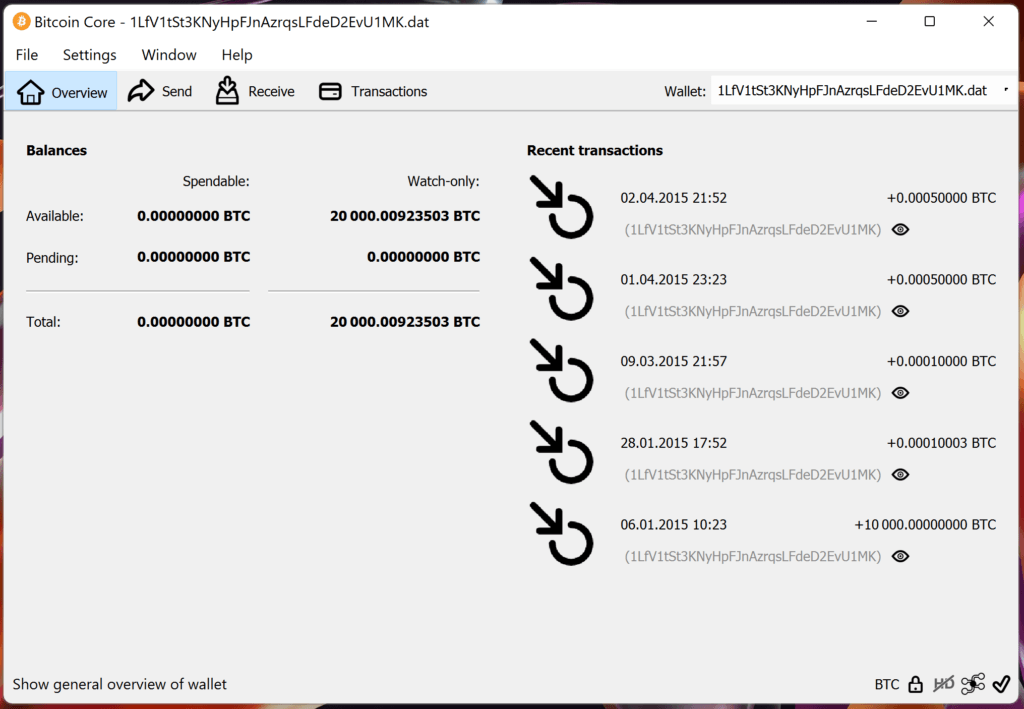
Next, place the file in the “wallets” folder and sync Bitcoin-QT. If balances and watch-only entries appear, this means the address is view-only and private addresses won’t be there. This wallet isn’t fake, but it’s useless for us.
Sometimes, only the wallet address is changed with a hex editor. In this case, after synchronization, old transactions and balances will appear. It appears that the wallet is legitimate. However, if you send coins (even minimal dust) to this address, the transaction won’t appear because the address is different.
An important point: the number of transactions in the list must match the data from blockchain explorers. All incoming and outgoing addresses can be found by searching for “name” in a hex editor. If there are discrepancies in the number of transactions or in the address book, the wallet is 100% fake.

In older wallets, when generating a new address, multiple addresses are created and stored in a file, with the file size changing during synchronization. After adopting BIP32 (HD wallet), a new Bitcoin address is created for each payment, and the keys are stored in xpriv format; the file size remains constant regardless of the number of addresses generated. This is also one verification method. You can also check the address types (segwit or p2pkh) according to the wallet version.
Verifying the digital signature and hash of a file
Trusted projects always publish checksums (SHA256) and PGP signatures for their files. This ensures that the program has not been modified.
The algorithm of actions is as follows:
- download the wallet file;
- compare its hash with the one listed on the official website;
- Verify the PGP signature if necessary;
- Make sure the values match exactly.
Even a single character mismatch is a reason to immediately delete the file.
Is it possible to download wallet.dat from the internet?
The short answer is no .
A pre-made wallet.dat file found on a forum, cloud storage, or third-party website is almost certainly dangerous. Such a file may:
- contain already compromised keys;
- be associated with fraudulent addresses;
- include malicious code;
- used to track transactions.
A secure wallet.dat can only be:
- created by you personally;
- restored from your backup;
- obtained from its own media.
How to securely create wallet.dat
The most reliable way is to create a wallet from scratch:
- Download the official Bitcoin client;
- install it on a clean system;
- Run the program and wait for the wallet to be created;
- encrypt wallet.dat with a password;
- make several backups.
It is recommended to keep copies:
- on an external storage device;
- in an encrypted archive;
- offline, without a permanent internet connection.
Checking your wallet for malicious code
Even the official file is worth double-checking:
- updated antivirus;
- specialized utilities;
- through several independent sources (if possible).
Also recommended:
- Do not run the wallet on an infected system;
- use a separate computer to store large amounts of money;
- update your software regularly.
Signs of a fake Bitcoin wallet
Be careful if your wallet:
- requires entering a seed phrase immediately after installation;
- offers “fast withdrawals” or bonuses;
- requests private keys;
- redirects to third-party sites;
- is installed without your consent.
Official Bitcoin clients never explicitly request private data.
What to do if you doubt the authenticity of wallet.dat
If you are unsure about a file:
- don’t open it;
- disconnect your computer from the Internet;
- scan the system;
- create a new wallet;
- Transfer funds only after full verification.
In cryptocurrencies, it’s better to be safe than sorry.
Conclusion
Bitcoin wallet security begins with user vigilance. Verifying the authenticity of a website, files, and sources isn’t paranoia, it’s a necessity. Never download wallet.dat from untrustworthy sources and don’t trust ready-made files.
Create your own wallets, make backups, and keep your private keys under your complete control. In the world of cryptocurrency, responsibility always lies with the owner—and that’s what makes Bitcoin truly independent.
Download Wallet.dat with Bitcoin balance
You can try the information provided on these wallets; they are actively sold on various forums, but do so at your own risk.
Read more:
 Top Cold and Hot Crypto Wallets BTC/ETH/ETC/BCH/LTC/XMR/DOGE+
  Cryptocurrency anonymity: the basics of confidential use of Bitcoin BTC
 ![XMRig v6.3.0 [CPU/GPU miner RandomX, KawPow, CryptoNight, AstroBWT, Argon2]](https://cool-mining.org/wp-content/uploads/2020/08/xmrig-5-1-0-kopiya-120x120.jpg) XMRig v6.3.0: CPU/GPU miner RandomX, KawPow, CryptoNight, AstroBWT, Argon2
XMRig v6.3.0: CPU/GPU miner RandomX, KawPow, CryptoNight, AstroBWT, Argon2  NANOMINER v1.9.2: Download The KAWPOW-miner for AMD and NVIDIA GPUs
  BitPay Wallet for Windows: Download, Overview, Installation, Use
  WASABI WALLET: Download anonymous wallet for Bitcoin BTC
  How to Mine RAPTOREUM: Download RTM Wallet and CPU Miners