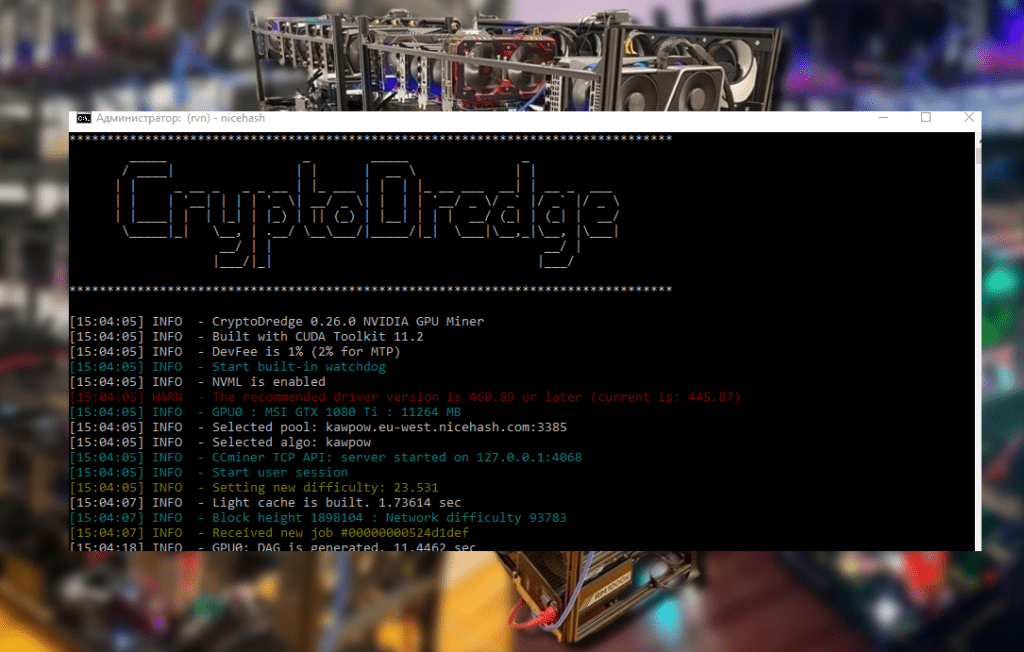
Bminer v16.0.7 – highly optimized cryptocurrency miner that runs on modern AMD / NVIDIA GPUs (Maxwell and Pascal, that is, on GPUs with a computing capability of 5.0 or higher). Bminer is one of the fastest miners available today – we use various methods, including mosaic and pipelining, to realize the full potential of the equipment.
Bminer also comes with REST APIs to simplify product deployment (such as mining farms).
- Bminer supports Equihash-based coin mining (e.g. Zcash) with 2% of devfee. Bminer supports mining coins based on Zhash / Equihash 144.5 (e.g. BitcoinGold, BitcoinZ) with 2% of DevFee.
- Bminer supports Ethash-based coin mining (e.g. Ethereum) with 0.65% of devfee.
- Bminer also supports dual mining mode – mining coins based on Ethash (e.g. Ethereum) and coins based on Blake14r (e.g. Decred) / coins based on Blake2s (e.g. Verge) at the same time.
- Devfee for dual mining mode is 1.3%, and the second coin (for example, Decred / Verge) is mined without devfee.
- Bminer supports mining coins based on Tensority (e.g. Bytom (BTM)) with 2% of devfee.
16.0.7
- Retire the supports for XVG, DCR, and VBK.
- Initial support for mining Ethash as well as dual mining Ethash and Handshake on AMD platforms.
Full list of available miner versions Bminer:
Fast start
- Download and extract Bminer to a folder (e.g. C: bminer or / home / bminer)
- Depending on the coins you want to mine,
- For example, the corresponding script is mine_grin29.bat (on Windows) or mine_grin29.sh (on Linux) when mining Grin using the Cuckaroo29 algorithm.
- Change the address and account information in the script.
- Run the script and enjoy mining ?
Recommendations
To achieve maximum efficiency and productivity of the Bminer miner, we recommend that you pay attention to the following useful programs, utilities and drivers:
Features Bminer
Fast
- Grin31 mining on stock settings
- 2.60 G/s on RTX 2080Ti
- 1.65 G/s on RTX 2080
- 1.55 G/s on GTX 1080Ti
- 0.95 G/s on GTX 1070
- Bminer 16.0.6 Grin29m mining on stock settings
- 8.32 G/s on GTX 2080Ti
- 5.18 G/s on GTX 2070
- 3.96 G/s on 2060
- 2.18 G/s on 1060
- 3.34 G/s on 1070
- 5.03 G/s on 1080ti
- 3.00 G/s on P104-4G
- 3.56 G/s on P104-8G
- 4.95 G/s on P102-10G
- AE mining on stock settings:
- 11.8 Sol/s on GTX 2080Ti
- 8.90 Sol/s on GTX 2080
- 7.40 Sol/s on GTX 1080Ti
- 4.7 Sol/s on GTX 1070
- 3.4 Sol/s on GTX 1060 6G
- Beam mining on stock settings
- 30 Sol/s on GTX 1080Ti
- 21 Sol/s on GTX 1070
- 12 Sol/s on GTX 1060 6G
- Equihash mining on stock settings
- 735-745 Sol/s on GTX 1080Ti
- 450-460 Sol/s on GTX 1070
- 315-325 Sol/s on GTX 1060
- Equihash 144,5 (Zhash) mining on stock settings
- 61 Sol/s on GTX 1080Ti
- 25 Sol/s on GTX 1060
- Ethash mining on GTX 1080Ti stock settings (power: 250 W)
- With : 46.7 MH/s
- Without OhGodAnETHlargementPill: 32.2 MH/s
- Dual mining using automatic tuning (default) on GTX 1080Ti stock settings (power: 250 W)
- With OhGodAnETHlargementPill:
- ETH 46 MH/s and DCR 1000 MH/s
- ETH 46 MH/s and XVG 1770 MH/s
- Without OhGodAnETHlargementPill:
- ETH 32 MH/s and DCR 2200 MH/s
- ETH 32 MH/s and XVG 3750 MH/s
- With OhGodAnETHlargementPill:
- Bytom mining on stock settings:
- 4650 H/s on GTX 1080Ti
- 2850 H/s on GTX 1070
- 1800 H/s on GTX 1060 6G
Secure and reliable
- SSL support
- Automatic reconnects to recover from transient network failures
- Automatic restarts if GPUs hang
Operation friendly
- Comes with REST APIs to facilitate production deployments
Release notes
16.0.7 (Current)
- Retire the supports for XVG, DCR, and VBK.
- Initial support for mining Ethash as well as dual mining Ethash and Handshake on AMD platforms..
16.0.6
- Improve the performance of Cuckaroo29m miner.
- Fix the regression that the Cuckatoo / Cuckoo miners failed to start.
- Fix the performance regression of Cuckaroo29m under Windows.
- Fix the compatibility issues on Windows system.
16.0.5
- Improve the performance of Cuckaroo29m miner.
16.0.4
- Improve the performance of Cuckaroo29m miner.
- Reduce the rejection rate of the Cuckaroo29m miner.
16.0.3 (Current)
- Improve performance and stability of the Cuckaroo29m miner.
- Fix fidelity issues of the Cuckaroo29m miner.
16.0.2
- Performance improvement on the Cuckaroo29m miner.
16.0.1
- Fix the Cuckaroo29m miner fails to start on Turing-based cards or cards that have only 4G memory.
- Fix the Cuckaroo29m miner submits shares that have low difficulty.
- Performance improvement on the Cuckaroo29m miner.
16.0.0
- Initial support for the Cuckaroo29m algorithm.
15.8.7
- Improve the performance of Beam bminer for RTX cards.
- Experimental support for dual-mining Ethash and the Eaglesong algorithm.
15.8.6
- Improve the performance of automatic tuning of dual mining parameters.
15.8.5
- Add an API to stop the miner.
15.8.4
- Improve the performance of BeamHashII algorithm on RTX cards.
15.8.3
- Improve the performance of BeamHashII algorithm.
15.8.2
- Fix the regression on the BeamHashII fails to start on GTX 2060.
15.8.1
- Support for the BeamHashII algorithm.
15.7.6
- Fix the regression that the Cuckaroo29d miner fails to start on RTX-series cards.
15.7.5
- Improve the performance of the miner of Cuckatoo31.
- Increase the dynamic ranges of -intensity for older machines to fully utilize the GPUs (at the cost of a slight performance loss).
15.7.4
- Improve the performance of Cuckaroo29d / Aeternity.
- Support 4GB cards for Cuckaroo29d.
- Fix the regression that the Cuckaroo29d miner fails to start on Windows.
15.7.3
- Improve the performance of the Cuckaroo29d miner.
15.7.2
- Improve the stability of the Cuckaroo29d miner.
- Reduce the CPU usage of Cuckaroo29d miner.
- Support 5GB cards for Cuckaroo29d.
15.7.1
- Improve the performance of the Cuckaroo29d algorithm.
- Fix the issue that the Cuckaroo29d failed to start for Turing-based cards.
15.7.0
- Support the cuckaroo29d algorithm
15.5.3
- Fix invalid shares ETH + VBK when using multiple cards.
15.5.1
- Fix the regression that Cuckaroo29 fails to work on Turing cards.
- Significantly improve the performance of ETH / VBK dual mine.
15.5.0
- Improve the performance of the Cuckatoo algorithm.
- Support dual-mining ETH and VBK.
- Add the parameter -version to output the version and exit.
15.4.0
- Improve performance of Cuckaroo29 / Aeternity.
- Improve compatibility on Windows
- Add an experimental flag –fast to improve the performance for Cuckaroo29 / Aeternity, but it might lead to unstability on some systems
15.3.1
- Slightly improve performance of Cuckaroo29 / Cuckatoo31.
- Reduce CPU usages of Cuckatoo31.
- Fix the regressions of Cuckaroo29 on RTX cards.
- Fix the incorrect reportings of Ethash speed to the mining pools.
15.3.0
- Improve the performance of Cuckaroo29 by 5%.
- Slightly improve the performance of Cuckatoo31.
- Improve compatibility on Windows.
15.2.0
- Improve performance and stability of Cuckatoo31.
- Slightly improved performance of Ccukaroo29.
- Reduced the chance of reject and stale shares of CC29/CC31.
- Support RTX 2080/2070 for Cuckatoo31. RTX 2080 expected speed 1.45G/s.
15.1.0
- Improve performance of Cuckaroo29 / Cuckatoo31.
- Experimental support Cuckaroo29 on AMD cards (ROCM only)
- Improve compatibility on Windows.
- Fix the regression on UI dashboard.
- Reduce reject rate of Cuckaroo29 / Cuckatoo31.
15.0.2
- Improve the fidelity of Cuckaroo29 on 1060 / P106 / 1070.
15.0.1
- Fix compatibility issues on Windows.
15.0.0
- Support 8G cards for Cuckatoo31 (except for Windows 10).
- Improve stability of the Cuckatoo31 solver.
14.3.1
- Improve the performance of Cuckaroo29.
- Reduce the likelihood of rejected shares of Cuckatoo31.
- Support Nicehash for both Cuckaroo29 / Cuckatoo31.
14.3.0
- Improve the performance for Cuckatoo31.
- Support 2080Ti for Cuckatoo31.
- Reduce the CPU usages for Grin / Aeternity by default.
- Reduce the likelihood of rejected shares for Cuckatoo31.
14.2.0
- Experimental support for Cuckatoo31 on 1080Ti.
- Fix the regression where ETH dual mine fails to start on Windows.
- Improve performance on mining Aeternity.
- Support tweaking the CPU usage for mining AE / Grin with the -intensity flag.
14.1.0
- Improve performance of AE / Grin on Turing cards.
- Improve performance of AE / Grin on lower-end CPUs and Windows platforms.
- Support mining beam on leafpool and nicehash.
- Fix the regression where /api/v1/devices is occasionally unresponsive.
14.0.0
- Improved Grin/AE mining speed.
- Print fidelity information. It is a measure of the luck/miner correctness. Overtime, the number should be close to one. For miners running over two hours, the fidelity should be at least greater than 0.95.
- Improved multi-card performance on Windows.
- Improved the miner fidelity by 8%-10%. You will not see big local difference but you will see roughly 10% higher speed on the pool side.
- Reduced reject chance.
- Fixed equihash issue.
- Fix the regression that the equihash miner fails to start on Windows.
13.2.0
- Improve the performance of Turing GPUs when mining Grin.
- Reduced rejected share chance for all cards.
13.1.0
- Support mining Grin / AE with 4G or 5G of video memory. (P104 only on Linux).
13.0.0
- 30% performance improvement on Grin and AE.
- Reduce the likelihood of rejected shares.
12.2.0
- Optimize CPU usage.
- Fix compatibility issues with grin-pool.org and grinmint.com.
- Experimental support for Turing GPUs.
- Allow bminer to run with older NVIDIA drivers.
12.1.0
- 50% performance improvement on Aeternity.
- 10% performance improvement on Grin.
- Support 8GB cards on Windows 10.
- Support SSL connections for Grin.
12.0.1
- Experimental support mining Grin on NVIDIA GPUs. Currently bminer only supports the Cuckaroo29 algorithm.
- 100% performance improvement on the beam miner on NVIDIA GPUs compared to 11.4.1.
- Bug fixes
11.4.1
- Support AMD Crimson driver mining beam [/b]
11.4.0
- Experimental support mining beam with AMD cards
11.3.0
- Improve the performance of Aeternity for 6GB cards
- Support mining beam over beepool
- Output solution/s instead of nounce/s when mining beam
11.2.0
- Experimental support for Beam.
11.1.0
- Experimental support for Aeternity.
11.0.0
- Support ETH/BTM dual mine.
10.7.0
- Fix `-devices value` option bug in 10.6.0.
- Fix a bug in `GET /api/v1/status/device` api.
10.6.0
- Require CUDA 9.2 or above for this version.
- Substantially increase BTM mining speed, e.g. 4650H/s on 1080Ti now.
10.5.0
- Require CUDA 9.2 or above for this version.
- Substantially increase BTM mining speed, e.g. 4500H/s on 1080Ti now.
- Maximum temperature is monitored more precisely.
- Support BTG mining on zhash.pro pool.
10.4.0
- Add `-pers auto` option to support pools (e.g. zergpool.com) to automatically switch personalization string for equihash144,5 mining.
10.3.0
- Make API robust and accessible even when GPUs are hung.
- Support ethproxy protocol pools, such as dwarfpool, to display worker names.
10.2.0
- Support all the other Equihash 144,5 based coins besides BTG, using equihash1445 scheme and -pers config.
10.1.0
- Fix performance regression in BTM mining.
10.0.0
- Support mining Zhash (Equihash with parameter set 144,5) based coins.
- Substantially increase BTM mining speed again (up to another 30%).
- Support reported hashrate feature on ETH pools.
9.1.0
- Substantially increase BTM mining speed (up to 30%).
- Fix editing problems of .bat files on windows.
- Add scheme suggestions in scripts for ETH mining.
9.0.0
- Experimental support for mining Bytom (BTM).
- Optimize the performance of automatic tuning in dual mining mode.
- Start REST APIs much faster than previous versions.
- Improve compatibility of mining Ethereum on Nicehash pool.
8.0.0
- Support a dual mining mode for Ethereum (ETH, Ethash) and Decred (DCR, blake14r) / Verge (XVG, blake2s) without affecting Ethereum mining performance.
- Automatically tune mining performance in dual mining mode.
- Support dual mining mode in launcher and dashboard GUI.
- Add scripts to download third party software OhGodAnETHlargementPill to improve Ethereum mining performance on GTX 1080/1080Ti.
- Introduce new REST APIs to display stratum/solver/device status.
7.0.0
- Experimental support for mining Ethereum.
- Various usability improvements on the launcher GUI.
- Create a lite distribution without the launcher GUI.
6.1.0
- Fix potential regression caused by 6.0.0 for GPUs mounting on risers.
- Improve mining algorithm stability.
6.0.0
- Failover server supports. Supply multiple uris (separated by commas) via the -uri option to enable the failover support.
- A launcher GUI for Windows.
- Reduce reject rate caused by stale shares.
- 0.3-0.5% performance improvement depending on card models.
- Fix inaccurate metrics at the start of Bminer.
- Reduce CPU usage the start of bminer.
- Support miner.reconnect().
- Experimental support for miningrigrentals.
- A new option -no-runtime-info to disable runtime information collection.
5.5.0
- Show the fan speed in both console and UI.
- Fix compatibility issues for pool.miningspeed.com.
- Fix a bug that causes Bminer fails to start on Windows under some configuration.
5.4.0
- Fix a reconnection issue in the network layer.
- Show additional statistics in console.
- Allow cross-domain requests to access the API.
- Fix the compatibility issue with docker.
- Introduce the option `-share-check` to make the time of recovering from no accepted shares configurable.
5.3.0
- Experimental support for EthOS / Ubuntu 14.04.
- Support AMD K10 CPUs.
- Automatically restart hanged network connections.
- Improve compatibilities with mining rigs with more than 8 cards.
5.2.0
- Introduced the option -logfile to append the logs into a file.
- Minor optimization on Windows for cards that are mounted on the risers.
- Improve compatibility for NiceHash.
5.1.0
- Support NiceHash.
- Fix unstable network connections in 5.0.0.
- Fix performance regressions for 1080Ti under Linux.
5.0.0
- Minor performance improvement for GTX 1060.
- Fixed performance regressions in 4.0.0 on Windows.
- Optimization on the networking layer.
- Show GPU ID in case of hardware errors.
- Introduced the option -no-timestamps which suppresses the timestamps in the logging messages.
4.0.0
- Minor performance improvement.
- Support older CPUs like Core 2 Duo.
- Support mining rigs that have more than 8 GPUs.
- Support luckpool.org.
- Removed the polling option.
- Introduced the option `-max-network-failures` which allows Bminer to exit after consecutive network failures.
- Various improvement on the UI.
- Localization for Russian and Chinese.
3.0.0
- Minor performance improvement.
- Disable CPU polling by default.
- Introduce a Web-based dashboard.
- Support slushpool.
2.1.0
- Add the -polling option to make GPU polling configurable.
Disabling polling reduces the CPU usage but it might reduce the performance in some configurations.
- Improve the stability of the network connections.
- First public release for Linux.
2.0.0
- First public release.
Recommended Related Articles:
Read more:
 NBMiner v33.4 (NVIDIA & AMD GPU Miner for ETH, RVN, GRIN, BEAM) NBMiner v32.1: Download GPU Miner ETH, RVN, GRIN, BEAM, AE, BTM, SERO, HNS, BFC
  MiniZ v1.6w2 – Cuda miner Equihash / BeamHash III
  PhoenixMiner 5.1c: Download fastest Ethash miner with Low DevFee (Win/Linux)
  Download miniZ v1.3 n5 (Equihash Cuda Miner, 2%)
  Download MiniZ v1.4o (Equihash Cuda miner)