InnoMonitor is a tool for the day-to-day management of Innosilicon ASIC miners. It allows you to perform batch operations, scan device IP addresses, monitor hashrate, firmware version, and other important hardware performance information.
Essentially, InnoMonitor serves as a program for monitoring and centralized management of Innosilicon miners. If you own devices from this brand—for example, the T2T, A10, A11, and other models—this software will become a convenient “control panel” for your entire system.
Why do you need it? Imagine you have dozens of devices connected to the same network. Without a dedicated tool, you’d have to open multiple browser tabs or manually check each miner. InnoMonitor solves this problem: it consolidates management of all your devices in a single window. You can immediately see their status, perform mass reboots, change settings, and quickly troubleshoot problems.
Essentially, this is the control panel for your mining rig. All key information is displayed in real time, greatly simplifying equipment monitoring and maintenance.
InnoMonitor is especially useful for those managing large fleets of ASIC miners, both at home and at work. It saves time, reduces the workload, and eliminates the need for additional monitors for each device.
The program is officially available for Windows and is primarily aimed at mining professionals and enthusiasts. However, its interface is simple and intuitive, so even a beginner can quickly get the hang of it. The only caveat is that the interface may default to Chinese, but you can easily switch between the two.
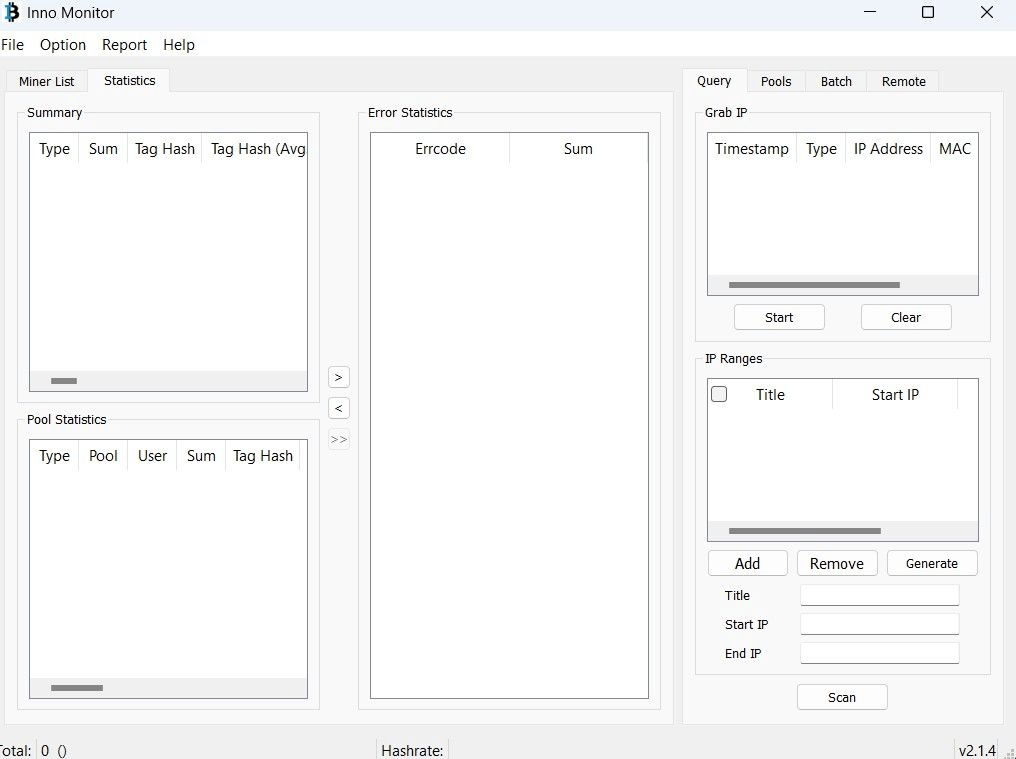
InnoMonitor Tool Interface Overview
InnoMonitor Tool is a convenient tool for monitoring mining equipment. It helps users monitor the status of devices and obtain key information about mining performance and efficiency. The program interface consists of two main tabs: Miner List and Statistics .
The Miner List tab displays the device’s basic parameters: IP address, type, operating mode, three hashrate indicators, and temperature. The right side of the interface contains additional functionality aimed at more experienced users and professional miners.

The second tab provides detailed information about the profitability of mining devices, as well as possible errors in their operation.
Devices can be conveniently sorted by various parameters using the corresponding tabs.
The File section provides the IPCSV import function, as well as subsequent data export for transferring information to other programs.
Brief instructions for using InnoMonitor
1. Installation and launch
- Download the program from the official Innosilicon website.
- Install and run InnoMonitor as administrator (recommended for proper network operation).
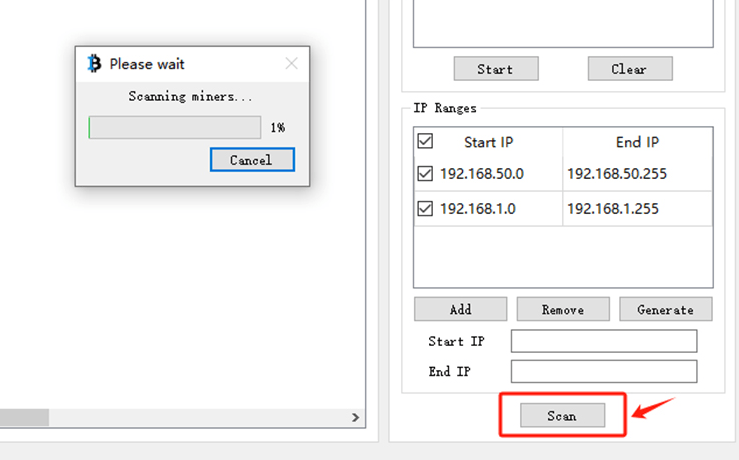
2. Scanning devices and adding found devices
- Click the Scan button (or similar).
- Please enter your network IP address range (for example: 192.168.1.1–255).
- Wait until the program detects all ASIC miners.
All detected ASIC miners are displayed in a table or list in the main InnoMonitor window. Key parameters are typically displayed here: IP address, device model, current hashrate, board temperature, fan speed, active mining pool, and worker name.
If you have multiple identical Innosilicon devices, the program allows you to combine them into a single interface for the first time—this significantly simplifies control and makes work much more convenient.
3. Viewing information
- After scanning, devices will appear in the list.
- You will be able to see:
- IP address
- hashrate
- temperature
- firmware version
- work status
4. Miner management
- Select one or more devices.
- Use the available actions:
- Reboot
- Update — firmware update
- Config — change settings (pools, password, etc.)
5. Bulk operations
- Mark several miners at once.
- Apply the desired action – it will be performed for all selected devices.
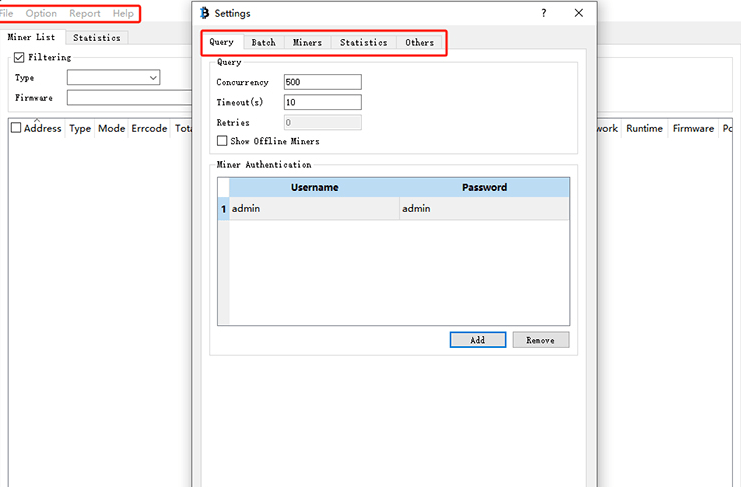
6. Change language
- Go to Settings.
- Find the language option and switch to English (if the interface is in Chinese).
7. Monitoring
- Monitor your metrics in real time.
- Pay attention to deviations (hashrate drop, overheating) – this will help you quickly identify problems.
Let’s sum it up
💡 Tip: Keep all miners in the same subnet—this will help InnoMonitor find and manage them faster.
InnoMonitor is truly an indispensable tool for miners working with Innosilicon ASIC devices. It takes care of routine tasks, freeing up time for more important decisions, such as choosing profitable coins, optimizing power consumption, and fine-tuning your mining strategy.
Thanks to the program’s ease of use and extensive capabilities, even beginners quickly get the hang of it and feel confident. And for experienced users, InnoMonitor becomes a fully-fledged control center—like a conductor’s stand in an orchestra.
Imagine: it’s nighttime outside, the market is volatile, cryptocurrency prices are fluctuating, and you’re calmly monitoring the system. One glance at the screen is enough to confirm that all your devices are operating reliably: the hashrate is normal, the cooling system is working properly, and the temperature is under control. This feeling of confidence and complete control is truly priceless.
Read more:
 AwesomeMiner (Crack): Download CPU/GPU/ASIC/FPGA Miner for Windows/Linux
  ASIC Miner Maintenance and Repair: A Beginner’s Guide
  Mining Laws and Regulations in 2025: Russia, EU, and the US
  PhoenixMiner 5.1c: Download fastest Ethash miner with Low DevFee (Win/Linux)
  Download TT-Miner v3.2.0 (Nvidia GPU miner)
  TT-MINER v3.0.5 (Nvidia GPU miner) DOWNLOAD
  Best Miner for Ravencoin (RVN): T-Rex, GMiner or NBMiner?
  PhoenixMiner v5.0e: Download Ethereum (Ethash) GPU miner for Windows & Linux.
  Mining Ethereum in on GPU and ASIC